Free Google Sheets Workout Template
A ready-to-copy workout program and tracker in Google Sheets. Enter your email and we’ll send you the link.
Free, no account needed.
Used by Trainers & Teams at…
How do I make a workout tracker in Google Sheets?
Open a new Google Sheet and add the columns Date, Exercise, Sets, Reps, Weight, and Notes. Log one row per exercise each session, freeze the header row, then filter to one exercise and chart its weight to see progressive overload. Or start from our free Google Sheets workout template, which has the layout built in.
Updated November 2026
How to Build a Workout Tracker in Google Sheets
- Create a new spreadsheet at sheets.google.com and name it after the program.
- In row 1, add the columns Date, Exercise, Sets, Reps, Weight, and Notes.
- Freeze the header with View, Freeze, 1 row.
- Log one row per exercise after each session.
- Choose Data, Create a filter, and filter the Exercise column to one lift.
- Select the Date and Weight columns and choose Insert, Chart to see that lift’s progress.
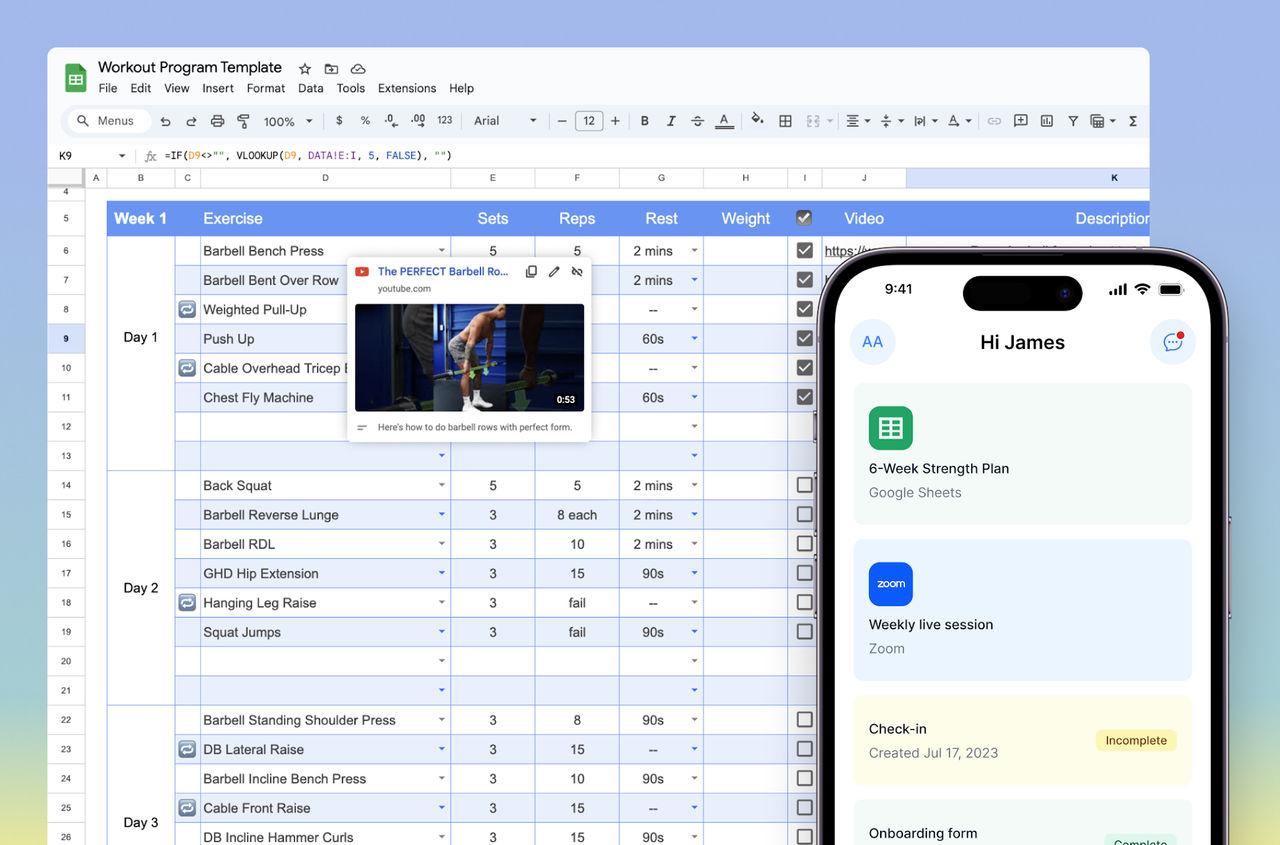
Google Sheets gives coaches a flexible way to plan workouts. Our free template is a Google Sheet you copy into your own Drive, then edit for each client.
Want clients to follow the plan and log their sets in an app instead? The free Superset programs below keep the same spreadsheet-style programming and add a client app.
The Free Google Sheets Workout Template
A workout program and tracker built in Google Sheets, ready to copy.
- Make a copy in your own Google Drive
- Edit the exercises, sets, and reps for each client
- Share the Sheet with your client
1. Aesthetic Blueprint
A bodybuilding program to adapt for clients working on muscle growth.
- Preview the workouts before saving
- Save your own copy in Superset
- Adjust the program for your client
2. Full Body Program
A full-body starting point for a client’s training plan.
- Preview the workouts before saving
- Save your own copy in Superset
- Adjust the program for your client
3. Dumbbell Strength
A starting point for clients training with dumbbells.
- Preview the workouts before saving
- Save your own copy in Superset
- Adjust the program for your client
4. Barbell Mastery
A strength program to review and adapt for barbell training.
- Preview the workouts before saving
- Save your own copy in Superset
- Adjust the program for your client
5. Minimalist Muscle
A beginner program to review before building a client’s first training block.
- Preview the workouts before saving
- Save your own copy in Superset
- Adjust the program for your client
Find another training plan
Browse the full gallery for more goals, equipment, and training styles.
- Review a program before saving it
- Choose a starting point that fits your client
Choosing Coaching Software?
Compare the apps coaches move to when templates stop scaling.
Frequently Asked Questions
How do I track progressive overload in Google Sheets?
Log the weight and reps for each exercise every session. Filter the sheet to one exercise and add a line chart of weight by date. A rising line means the load is going up.
How do I turn a Google Sheets workout plan into a PDF?
In Google Sheets, choose File, Download, PDF. Set the layout to fit the width so every column stays on the page.
What can I use instead of a Google Sheets workout template?
A free Superset program gives you a spreadsheet-style programming workflow with a client app, where clients follow the plan and log their sets.
Why do coaches use Google Sheets for workout plans?
Google Sheets offers a flexible grid for planning exercises, sets, reps, and progression. Superset offers a spreadsheet-style programming workflow with a client app.
Is there a free Google Sheets workout template?
Yes. Enter your email on this page and we’ll send you a link to our free Google Sheets workout template. Make a copy in your own Google Drive, then edit it for each client.
Are the featured programs Google Sheets downloads?
No. The five featured programs are free Superset templates from our template gallery. Each preview opens in Superset, where you can save and customize your own copy.
Which free workout template should I choose?
Choose a starting point for your client’s goal and equipment: Aesthetic Blueprint for bodybuilding, Full Body Program for general training, or Dumbbell Strength for dumbbell workouts. Review the preview before saving.
What happens when I save a template?
Superset creates your own copy of the program. You can edit exercises, sets, and reps, then assign it to a client.
Keep It in Superset
Save the template, edit it for each client, and send it in a few taps. Trusted by 1,000+ coaches.